Know why your Mac feels slow.
MacReveal scores your Mac’s health, explains every slowdown in plain English, and clears the clutter with ⌘ Z undo. One app. $9.99, once.
Notarized by Apple
- Pay once, own it
- 30-day refund
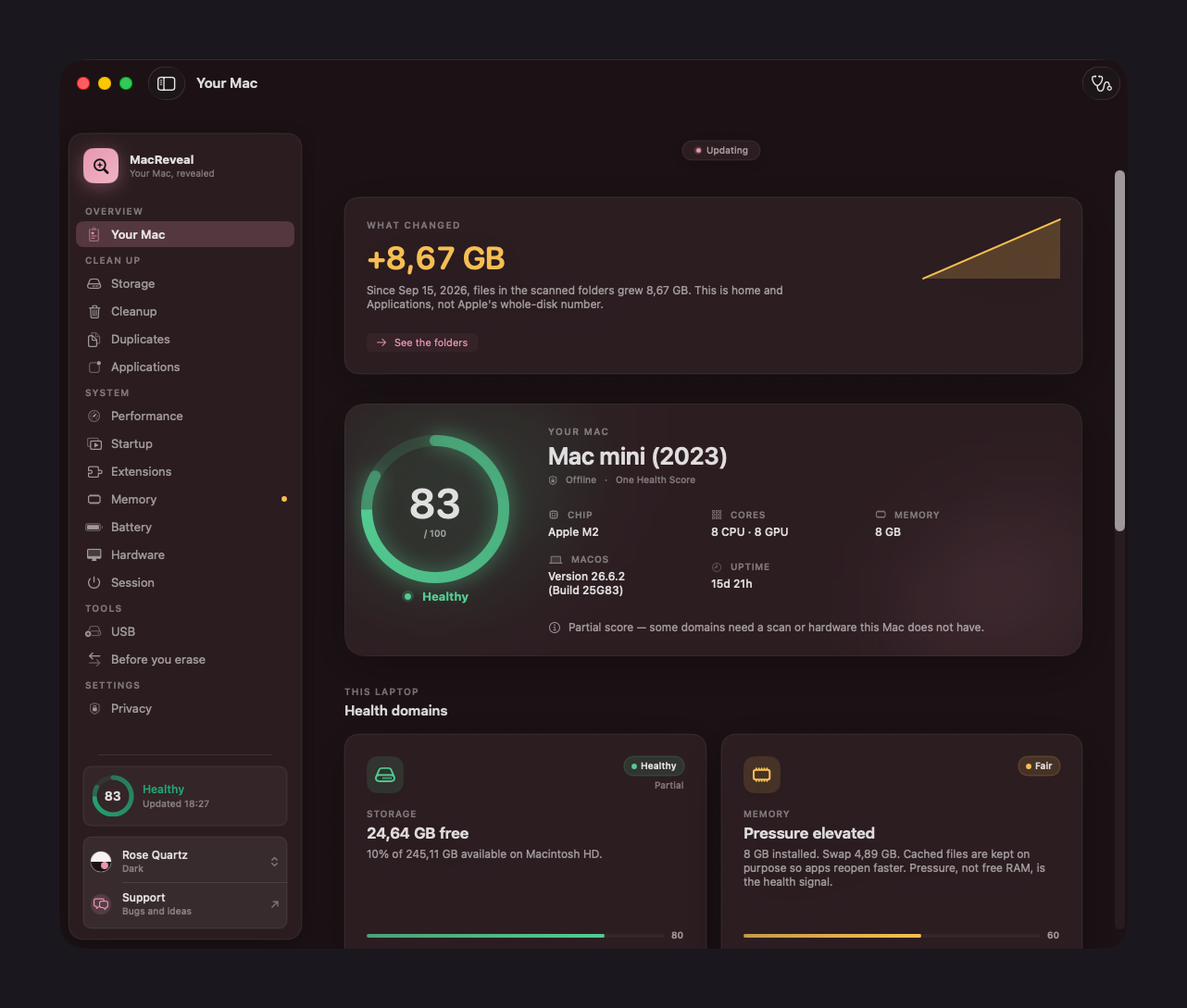
- 21tools in one native app
- 2slive graph refresh
- $9.99once. Not per year.
- 30day self-serve refund
The difference
Activity Monitor gives you numbers. MacReveal gives you the answer.
Without MacReveal
8 of 412 processesSo… which one is the problem? Is any of it a problem?
With MacReveal
FairMy Mac feels slow
Safari is holding 4.1 GB, and 1.2 GB of memory is in swap.
Pressure
Elevated
Swap
1.2 GB
Startup
15 items
Do this first: close the Safari tabs you aren’t using. That frees the most memory, fastest.
Illustration with sample values.
Inside the app
The real app. Not a mockup.
Screenshots from a shipping MacReveal build. What you see is exactly what you get.
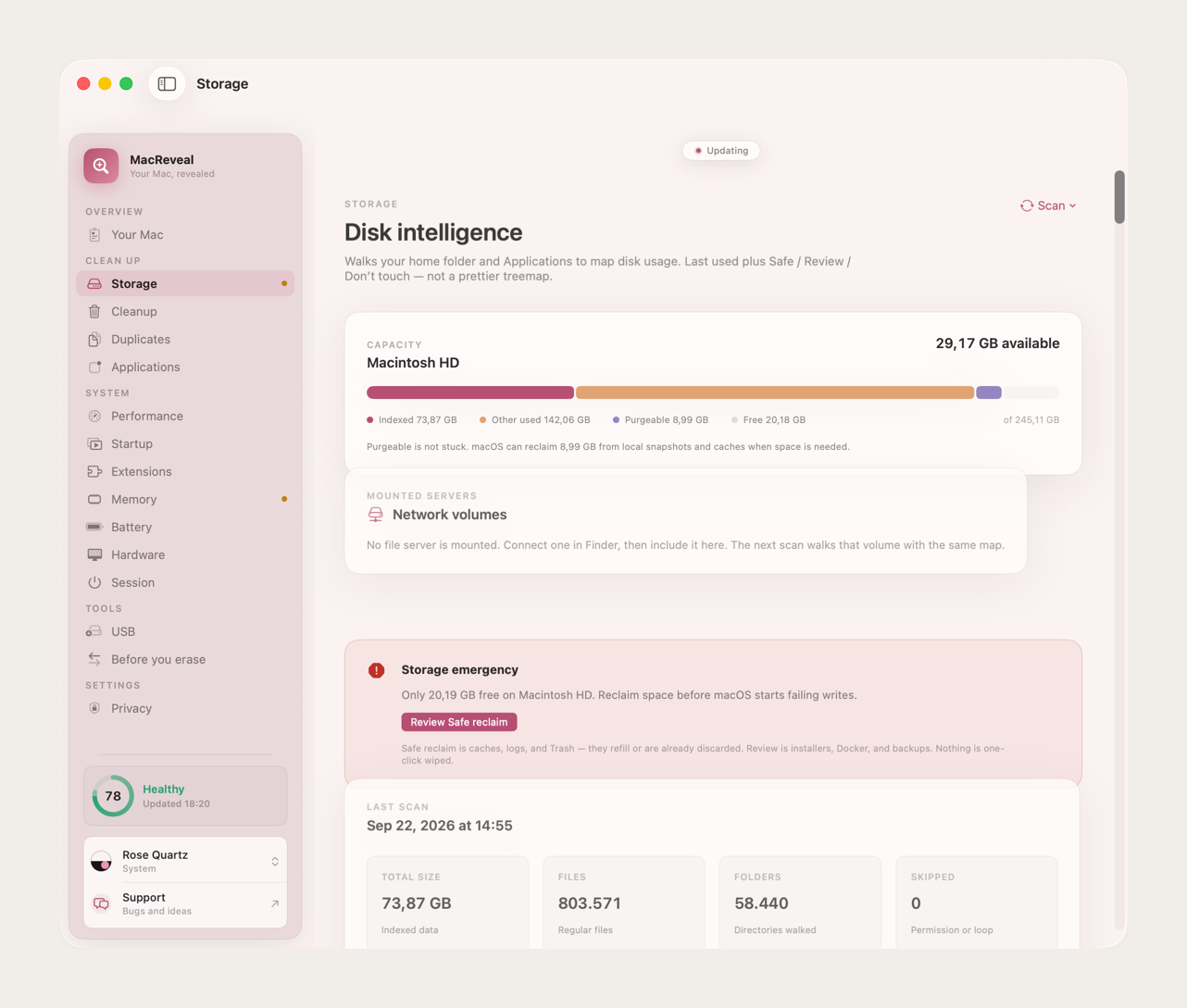
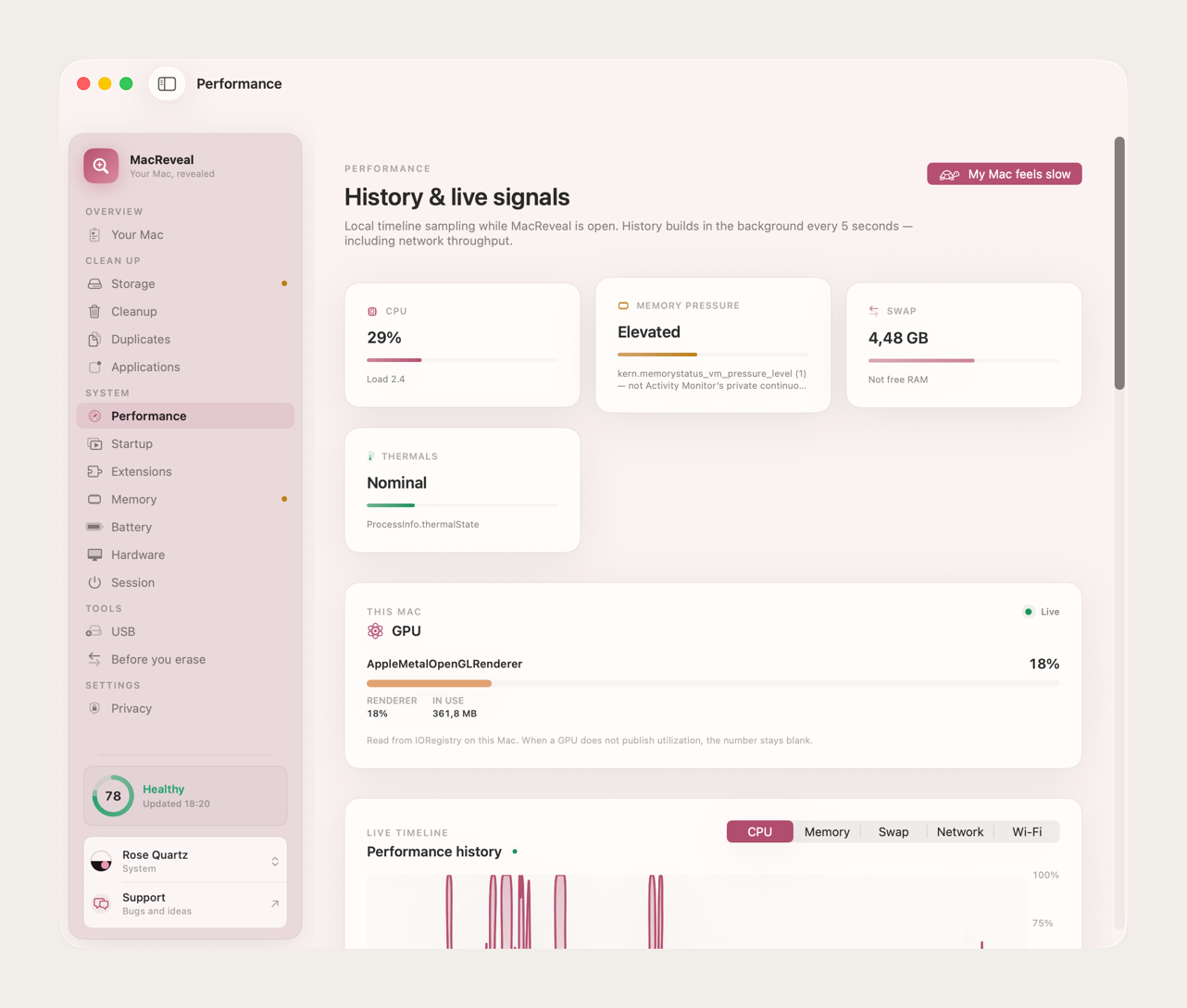
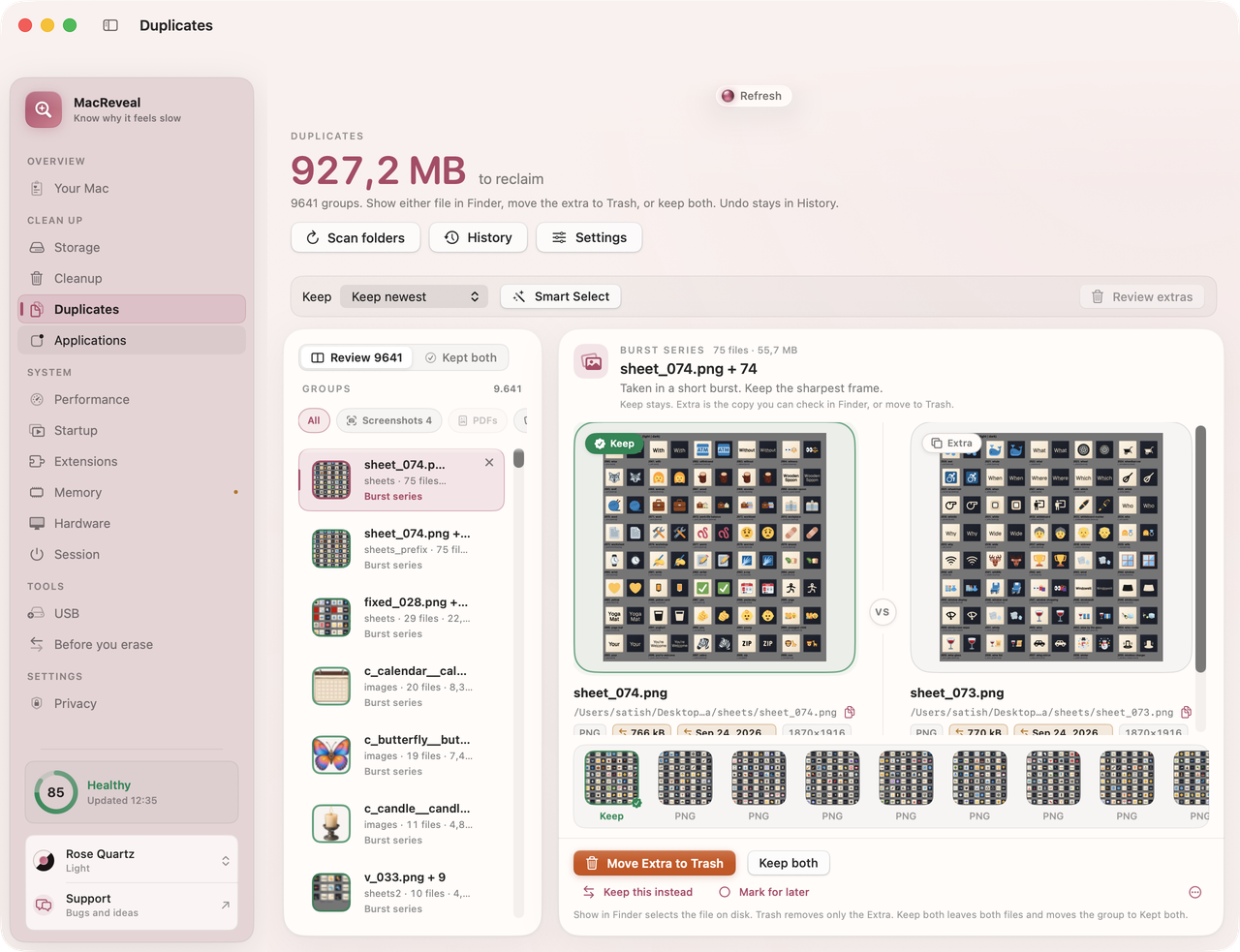
See what fills your disk
Every file gets a label: Safe, Review, or Don’t touch. You see what grew, when you last opened it, and how much you get back.
- Visual disk map
- Caches, backups, installers, Docker, Git
- Growth since your last scan
Features
Everything about your Mac, answered.
Clear numbers, plain reasons, and fixes you can take back.
Mac Health Score
One number out of 100 for your whole Mac, with every reason beside it. You always know where it stands, and what moves it.
Right now, at a glance
CPU, memory, disk, network and thermals, each with a live graph.
Why it feels slow
One plain answer, and the one step that helps most.
Storage with a story
What fills your disk, when you last used it, and what’s safe to remove.
Cleanup you can undo
Review it, clean it, change your mind. Everything goes to the Trash first.
Duplicates you can trust
Matches side by side. Keep the best copy, trash the rest.
A network with names
Real device names, per-app traffic, Wi-Fi quality and a speed test.
A briefing you can send
Share a report as PDF or Word in one click, for whoever helps you with your Mac.
Private by design
No account to create. No analytics in the app. Scans and history stay on your Mac.
Brightness on every monitor
Hardware brightness where the monitor supports it, smooth dimming everywhere else. Check your display
Battery care
Health, cycles and alerts for your Mac, plus your mouse, keyboard and AirPods.
Everything included
21 tools. One app. No subscription.
The drawer of Mac utilities you’d otherwise buy one by one, in a single native app that feels like it shipped with your Mac.
Get all 21 for $9.99Understand your Mac04
Health Score
A score out of 100, with the reasons beside it.
Plain-English answers
What’s shaping your Mac’s speed right now, and the one step that helps.
Shareable briefing
Copy, mail, or save a report as PDF or Word.
Menu bar status
Your Mac’s health one click away while you work.
Free up space06
Storage map
A visual map of your disk, every item labeled.
Smart storage panels
Caches, iPhone backups, Mail attachments, installers, Docker, Git, snapshots.
Growth over time
See what grew since your last scan. Schedule scans.
Trash-first cleanup
Move to the Trash, undo with ⌘Z, every move kept in History.
Duplicates, side by side
Photos, PDFs and downloads. Keep the best.
Complete app removal
Apps by size and last use, removed with their leftovers.
Speed and network03
Live performance
CPU, memory pressure, swap, GPU and thermals on a timeline you can scrub.
Startup and extensions
Every login item, launch agent and browser extension, with a timed login story.
Network insight
Per-app traffic, Wi-Fi quality, VPN status, device names and a speed test.
Hardware and power04
Hardware at a glance
Chip, memory, sensors, disk health and a disk benchmark.
Display control
Hardware brightness, smooth dimming, and saved layouts.
Battery care
Health, cycles, alerts, plus your mouse, keyboard, trackpad and AirPods.
Session tools
Keep your Mac awake as long as you choose, or schedule a shutdown.
Tools and privacy04
Bootable USB
Make a macOS installer, or write an ISO, IMG or DMG to USB.
Clean image metadata
Strip GPS, EXIF and macOS attributes before you share photos.
Before you sell
A guided checklist that ticks itself off.
Private by design
Scans and history stay in a local database. No account.
How it works
From “why is it slow?” to fixed, in three steps.
- 1
Step 1: Scan
One click gives you a health score and the reasons behind it.
- 2
Step 2: Grant access, if you like
Optional. One switch for Full Disk Access shows MacReveal the whole picture.
- 3
Step 3: Fix what you approve
Every suggestion explains itself. Every change can be undone.
Privacy
Your scans stay on your Mac. That’s the product.
MacReveal goes online only to activate your license, check for updates, and run tests you start.
On-device by default
File names, scores and scan results live in a local database on your Mac.
No account, no app analytics
Activate once with your key. MacReveal works offline after that.
Network tests are opt-in
Speed test and device discovery run only when you start them.
Pricing
One price. Every tool. Forever.
No subscription. No tiers. No upgrade fees. Pay once and every update is yours.

MacReveal
Lifetime license · one Mac
Pay once. Nothing renews, ever. Tax is handled at checkout.
Key and installer by email a minute after checkout.
Everything included
- Mac Health Score with reasons
- Live CPU, memory, disk, network graphs
- Storage map and smart panels
- Trash-first cleanup with ⌘Z undo
- Duplicates and complete app removal
- Startup, extensions and network insight
- Display brightness and battery care
- Bootable USB and image metadata cleaner
- Every future update, including major versions
30-day refund
Notarized by Apple
Signed and checked by Apple
Moves with you
“I’ve built software for 20+ years. MacReveal is the tool I wanted for my own Macs: clear numbers, calm answers, and you in control.”
FAQ
Questions, answered.
Something else on your mind? Ask a real person. Replies usually land the same day on weekdays.
How much does it cost?
What exactly do I get?
Is cleanup safe?
Where does my data live?
Will it slow my Mac down?
How is it different from Activity Monitor?
Which Macs does it support?
Can I move my license to a new Mac?
What if it isn’t for me?
Will it keep improving?

Stop guessing. Start knowing.
Every answer about your Mac, and every update after today, for $9.99 once.
macOS 14 or later · Apple silicon and Intel · 30-day refund